Blog
Juwa 2.0 Download: How to Install and Play Online
Games
- What Is Juwa 2.0 and What Makes It Different?
- It still works as a sweepstakes platform
- How to Download Juwa 2.0 on Android
- How to Download Juwa 2.0 on iPhone
- How to do it on Android
- Setting Up Your Juwa 2.0 Account
- How to get an account
- The payment system
- What Games Are Actually Waiting for You in Juwa 2.0?
- The daily bonus system
- Staying Safe — The Part People Skip and Then Regret
- The real risk with APK files
- Account security basics
- The Bottom Line
So you've heard about Juwa 2.0 and you want to get in. Maybe you've been on the original Juwa for a while and you're ready to upgrade. Maybe you're completely new and someone told you this is worth checking out. Either way, you're in the right place.
This guide is going to walk you through everything — what Juwa 2.0 actually is, how to get it on your Android or iPhone, how to play without downloading anything at all, what games are in there, and how to not get burned by a fake APK in the process. No fluff, no filler. Just everything you need to know in plain language.
What Is Juwa 2.0 and What Makes It Different?
If you've used the original Juwa before, you already know the basics. It's an online casino-style gaming platform — slots, fish table games, blackjack, poker, the whole spread. It's popular in the US, it runs on your phone, and it's genuinely fun to play when everything is working properly.
The "when everything is working properly" part is exactly why 2.0 exists.
The original version had problems. Games would lag on mid-range phones. The menus were clunky and unintuitive. Sometimes the app would just crash mid-session for no obvious reason, which when you're in the middle of a good run on a fish table, is genuinely infuriating. The graphics looked dated. Loading times were slow enough to be annoying.
Juwa 2.0 went back and fixed most of that. The loading is noticeably faster — games that used to take a few seconds to open now just snap open. The graphics have been properly upgraded with sharper animations and richer colors across the whole library. The menus were redesigned so finding things actually makes sense. And the stability improvements are real — long sessions on mid-range Android phones run smoothly now in a way they just didn't before.
The game library also grew substantially. The 2.0 version has over 70 games, which is a significant jump from what the original offered.
It still works as a sweepstakes platform
One thing that hasn't changed is how the platform operates legally. Juwa 2.0 runs as a sweepstakes-style gaming platform, which is how it stays accessible across most US states without running into the legal complications of a traditional online casino. You buy virtual coins or credits, you play with those, and you can potentially redeem winnings through the platform's supported payment channels. It's designed for adults 21 and up, and understanding that framing matters before you put any money in.
How to Download Juwa 2.0 on Android
Before you even download anything, keep one number in mind: 200 to 220 megabytes. That's roughly the size of a legitimate Juwa 2.0 APK file. If the file you're looking at is 5MB, or 30MB, or some suspiciously small number, it's not the real thing. File size is your first quick sanity check before you install anything on your phone.
Step 1 — Go to the official Juwa website. Open Google Chrome and type the URL directly into the address bar. Don't Google "Juwa 2.0 APK download" and click random results — that's exactly how people end up with modified files or worse. Find the download link on the official site itself.
Step 2 — Download the APK. Tap the download button. Chrome might throw up a warning message along the lines of "this file type can harm your device." This is a standard warning that Android shows for any APK downloaded outside the Play Store — it's not specific to Juwa. Tap "Download anyway."
Step 3 — Allow installation from unknown sources. Android blocks APK installations by default until you explicitly say otherwise. On Android 8.0 and newer, go to Settings, then Apps, then Special App Access, then Install Unknown Apps. Find Chrome in the list and toggle on "Allow from this source." On older Android phones, it's Settings, then Security, then toggle on Unknown Sources.
Step 4 — Install it. Open your file manager, go to Downloads, tap the Juwa 2.0 APK file, and tap Install when prompted. Give it 30 to 60 seconds and it's done.
Step 5 — Go back and turn off that permission. This is the step most people skip and really shouldn't. Once Juwa 2.0 is installed, go back to Settings and turn off the "Allow from this source" permission you just enabled. You don't need it on permanently and leaving it on creates an unnecessary security opening on your phone.
Step 6 — Open the app, log in, and play. Tap the Juwa 2.0 icon that appeared on your home screen, enter your credentials, and you're in.
How to Download Juwa 2.0 on iPhone
iPhone is a slightly different process — here's why
iPhones don't use APK files at all. That's an Android thing. On iOS, Juwa 2.0 gets onto your phone through something called an Enterprise Developer Certificate. Apple created this system so that companies could distribute internal apps to their employees without going through the App Store. Juwa uses the same mechanism to deliver the app to iPhone users.
It works fine, but there's one extra step that almost everyone gets tripped up by if they don't know it's coming. So let's just make sure you know it's coming.
The full iPhone installation process
Step 1 — Open Safari specifically. Not Chrome, not Firefox — Safari. iOS enterprise app installation is handled through Safari's system integration, and other browsers won't trigger the installation flow correctly.
Step 2 — Go to the official Juwa website and find the iOS download link. Tap it. A prompt will appear asking if you want to install the app. Tap Allow or Install. The Juwa 2.0 icon will appear on your home screen, but here's the thing — the app won't actually open yet. This is normal, and here's why.
Step 3 — Trust the developer profile. When you try to open the app, your iPhone will show you a message that says something like "Untrusted Enterprise Developer — this developer has not been trusted on this iPhone." Don't panic. This is expected. To fix it, go to Settings, then General, then VPN & Device Management. You'll see the Juwa developer profile listed there. Tap it, tap Trust, and tap Allow on the confirmation prompt.
Step 4 — Restart your iPhone. After trusting the profile, restart your phone. This completes the process.
Step 5 — Open and log in. After your phone restarts, tap the Juwa 2.0 icon. It should open fully now. Log in with your account details and you're good to go.
If your phone shows a "Ready to Install — Swipe Up to Continue" message after the restart, follow that step before opening the app.
Actually, You Don't Have to Download Anything At All
The browser version is a completely legitimate option
Here's something a lot of people don't realize until someone tells them. Juwa 2.0 has a full web-based version that runs directly in your phone's browser. No APK. No enterprise certificates. No installation of any kind. You just open Safari or Chrome, go to the official Juwa site, log in, and play. The web version has access to the complete game library with the same graphics and features as the installed app.
For a lot of people — especially iPhone users who don't want to deal with the enterprise certificate setup — the browser version is honestly the path of least resistance and it gets you to the exact same games.
How to do it on Android
Open Chrome, type the official Juwa URL into the address bar, let the mobile site load, tap Login and Play, enter your credentials, and tap any game to launch it. It opens right there in Chrome. Nothing to install, nothing to approve. Done.
How to do it on iPhone
Open Safari, type the official Juwa URL, let the site load, log in, and play. Every game opens inside Safari. This is especially the recommended route for iPhone users who want to skip the enterprise certificate process entirely.
Should you bother downloading the app or just use the browser?
Honestly, this comes down to personal preference more than anything technical. If you play Juwa regularly and want the absolute fastest experience, the installed app is slightly snappier because it doesn't have to load a browser session first. If you play occasionally, don't want to use up phone storage, or you're on an iPhone and the enterprise certificate process sounds annoying, the browser version is completely fine. You're not missing any games. You're not missing any features. The only meaningful difference is that the installed app sends push notifications when bonus events or promotions go live.
There's also a middle ground worth knowing about. You can add the Juwa website to your iPhone or Android home screen as a shortcut and it behaves almost exactly like an app — it launches in full-screen mode with no browser bars visible. On iPhone, tap the Share button in Safari and tap "Add to Home Screen." On Android, tap the three-dot menu in Chrome and tap "Add to Home Screen." Takes about ten seconds to set up.
Setting Up Your Juwa 2.0 Account
How to get an account
One thing that genuinely improved in Juwa 2.0 is the registration process. The original version mostly required going through a distributor or agent — you'd contact someone, explain what you wanted, make a deposit, and then wait for them to send you login credentials. That system still exists and still works, but 2.0 now lets you register directly on the platform in many cases.
For direct registration, go to the official site, click Sign Up or Register, fill in your email address, choose a username and password, and you're set. It takes a few minutes. Once you're in, check the Promotions or Bonus section before you do anything else — new player bonuses and welcome credits are commonly available and there's no reason to leave that on the table.
For distributor-based registration, which is still common for certain real-money builds of the platform, you reach out to a verified Juwa agent, they create your account, and you receive credentials after your initial deposit. The experience varies by distributor but is generally quick.
The payment system
Juwa 2.0 uses virtual credits for gameplay. You load credits into your account through supported payment methods — Cash App being the most widely used — play with those credits, and can withdraw winnings back through supported channels. The 2.0 version upgraded the in-app ATM section (that's what the transaction management area is called on most builds), making deposits and withdrawals more straightforward than they were before. Still worth reading through the terms for your specific platform build before putting any real money in.
What Games Are Actually Waiting for You in Juwa 2.0?
Over 70 games across multiple categories as of early 2026, and new titles keep getting added. Here's the breakdown of what's in there.
Slots are the biggest category and the heart of the platform for a lot of players. You've got classic three-reel machines, five-reel video slots with all kinds of different themes, progressive jackpots that build up over time, and bonus-round machines that have their own mini-game mechanics built in. Each slot genuinely has its own personality — it's not just the same game reskinned ten different ways. Popular titles include Fortune Tiger, Lucky Wheel, Cash Cow, and Dragon's Treasure, though availability can vary depending on which build you're on.
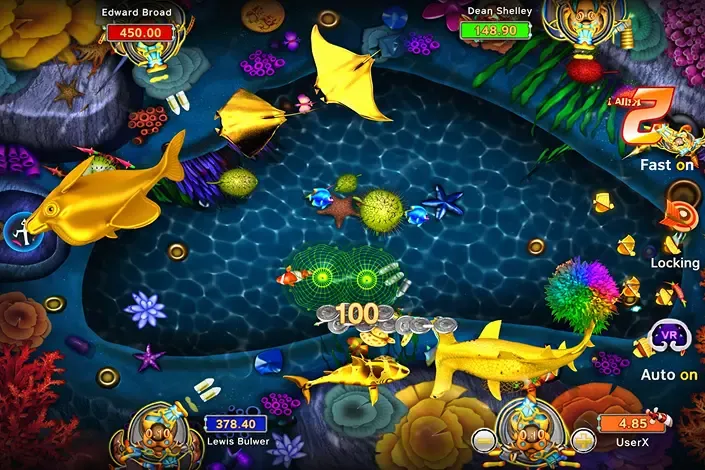
Fish table games are what a huge portion of the Juwa player base is really there for. These are multiplayer shooter-style games where you aim a virtual cannon at fish swimming across the screen — different fish are worth different point values, and you're competing alongside other players at the same table. The strategy is in choosing your targets. Big fish pay more but cost more ammo to take down and are harder to hit. Small fish are cheaper and easier but the payouts are modest. Ocean King 3 and Golden Dragon are the standout titles in this category, and they're genuinely engaging in a way that a lot of slots aren't.
Keno is there for players who want something more relaxed. Pick your numbers, wait for the draw, get paid based on how many matches. Quick rounds, simple mechanics.
Arcade and mini-games round out the library with wheel spins, card matching games, dice challenges, and short-session stuff that's good for when you want to play something but don't want to sit down for a full slot or fish table session.
Table games including blackjack, poker, and roulette are available on certain builds of the platform for players who prefer games where strategy actually plays a role.
The daily bonus system
Juwa 2.0's daily reward structure is noticeably more generous than the original version. Log in each day and you get a spin on the daily bonus wheel, with prizes that increase the longer your consecutive login streak is. Log in five days in a row and the rewards are meaningfully better than on day one. Weekend Mega Jackpot Mission events offer larger prizes and run regularly. Seasonal promotions cycle through and often come with themed events and limited-time games.
The practical advice on bonuses is simple: always collect your daily reward before you start spending credits. Takes about ten seconds and you're getting something for free that you'd otherwise miss.
Staying Safe — The Part People Skip and Then Regret
The real risk with APK files
Let's be straight about this because it actually matters. Downloading APK files from unofficial sources is a genuine risk. APK files don't go through any vetting process the way Play Store apps do, which means a malicious APK could contain malware, spyware, or code designed to harvest your login credentials and payment information the moment you type them in. There are fake Juwa APKs circulating online right now built specifically to do exactly that.
The defense is simple but you have to actually follow it. Only download from the official Juwa website. Verify the file size when it downloads — the real Juwa 2.0 APK is around 200 to 220 megabytes. If the file you downloaded is dramatically smaller than that, don't install it. And after installation, turn off the "Install Unknown Apps" permission you enabled. Don't just forget about it.
For iPhone users, the same principle applies to the developer profile trust step. Only trust the profile that appears through the official download process. The developer name shown on your device should match what the official installation instructions tell you to expect. If it doesn't match, stop and don't proceed.
Account security basics
Use a password you don't use anywhere else. Seriously, don't reuse passwords for gaming platforms that handle financial transactions. Never share your login credentials with anyone, including people who message you on Facebook, WhatsApp, or Instagram claiming to be Juwa support or offering to help you with your account. Real support teams do not ask for your password through social media. Log out properly when you're done playing rather than just closing the app — especially important on shared phones or tablets. And if you ever get a message with a link claiming to be a Juwa bonus or special download, type the URL yourself rather than tapping the link.
Keeping the App Updated
You have to do it manually — here's why
Because Juwa 2.0 isn't on the Play Store or App Store, your phone won't automatically notify you when updates are available the way it would for regular apps. Updates get announced through the official site and sometimes through distributors. When a new version drops, you download the new APK on Android or trust the new profile on iPhone and install it over your current version.
This matters more than people realize. Updates often include security patches. Playing on an outdated version means you could be missing fixes for known vulnerabilities. New games also typically only appear in the latest version, so if you're wondering why you don't see a game someone else mentioned, an update might be why.
The browser version doesn't have this issue — it updates automatically on the server side so you're always current without doing anything.
The Bottom Line
Juwa 2.0 is a genuine upgrade and it's worth switching to if you're still on the original. The speed difference hits you immediately, the games look better, and the stability improvements make long sessions actually enjoyable rather than a gamble against whether the app is going to crash on you.
Getting set up takes maybe ten to fifteen minutes depending on which route you choose. The browser version is the fastest path if you just want to play right now. The installed app is worth the extra setup time if you play regularly and want peak performance.
Just don't rush the safety steps. The extra two minutes it takes to verify the APK file size, turn off the unknown sources permission after installation, and set a proper password is two minutes that could save you a genuinely bad situation down the road.
Go play, have fun, collect your daily bonus before you do anything else, and remember that fish tables are more strategic than they look.
Purchase Securely With